Why my home DNS was answering from Adelaide
My home network was sending every encrypted DNS lookup to Adelaide when the fastest server was in Melbourne. One setting in UniFi fixed it.

Part of the Home Dash series in The House Project. This one is a little adjunct to the main pieces. It isn't about the dashboard itself, but about the home network that sits underneath it. Last updated 20 November 2026.
The short version
My home network was sending every encrypted DNS lookup to Adelaide. The fastest NextDNS server for my connection sits in Melbourne, 4 to 6 ms away. One setting change in UniFi fixed it. Fresh lookups through my gateway dropped from 101 ms to 21 ms.
I didn't go looking for that problem. I started with a simpler question. Which public DNS resolver is actually fastest from Melbourne?
DNSPerf publishes a well-known ranking of public resolvers. It is a good starting list, but its numbers come from test probes spread across the world or a whole region. Oceania puts Melbourne in the same bucket as Perth and Auckland. The only way to know what is fastest from my desk is to test from my desk.
So I wrote a small script, tested around 20 resolvers from home early on a Friday evening and let the results lead. This post walks through the method, what I found and the fix. The script is at the end if you want to run it yourself.
How I tested
The test is a single bash script that runs on a Mac using dig, curl and traceroute, all built in. It queries each resolver directly from my home connection. It follows DNSPerf's method, which is IPv4, a one-second timeout and no retries.
The resolver list is drawn from the public resolvers DNSPerf tracks. The script also adds whatever DNS server the machine is currently using, so my own gateway shows up as a baseline row.
Speed alone doesn't tell the whole story, so the script measures eight things.
| Measure | What it tests | Why it matters |
|---|---|---|
| Cached median (ms) | Popular names the resolver almost certainly has in cache | Mostly how close its nearest server is to you |
| Uncached median (ms) | Random made-up names that force a full lookup | How quickly it does real work |
| Cached p95 (ms) | The slowest 5% of cached answers | Consistency. These are the stalls you notice |
| Edge connect (ms) | Time to connect to the server each resolver sends you to for iCloud, Google, Outlook, Teams and Netflix | A fast resolver that points you at Singapore costs you on every connection |
| Hops | Traceroute hop count to the resolver | A diagnostic. Anycast makes it a poor quality signal on its own |
| DNSSEC | Whether the resolver validates signatures | Security |
| Site | Which of the resolver's locations answered | Shows where you are really being served from |
| Fail % | Queries with no answer inside one second | Reliability |
Each resolver then gets one score, where lower is better.
Score = 0.5 × cached median + 0.3 × uncached median + 0.2 × cached p95
        + 1.0 × edge connect + 1 ms per hop + 5 ms per 1% failed
Here C is the cached median, U the uncached median, P95 the cached 95th percentile and E the edge connect time. Edge carries full weight on purpose. You pay for a lookup once, but you pay the distance to the server on every connection after it.

The test names came from my own traffic. I took the top destinations from my UniFi dashboard (time servers, iCloud, Gmail, Google Calendar, UniFi's own services) and added Microsoft 365. That makes the results relevant to my house. It also gives NextDNS a home advantage, because my devices keep those names warm in its cache.
First results
The first run split the field into three clear groups by distance. The site check I added later confirmed where each one answers from.
- Melbourne, 5 to 7 ms. NextDNS (one of its two addresses), Quad9, Cloudflare, CleanBrowsing and Google.
- Sydney, 14 to 17 ms. NextDNS's other address, OpenDNS, UltraDNS, Verisign, AdGuard, ControlD, Comodo, SafeDNS and Gcore.
- Overseas, 99 to 300 ms. Level3 answered from Singapore. DNS4EU, Yandex and DNS.Watch answered from Europe.

My first test run, 5:23pm 20 Nov 2026 · 14 resolvers shown, with overseas, failed and block-page resolvers left out
The split is about 10 ms. That is the round trip between Melbourne and Sydney, paid on every lookup a resolver hasn't cached nearby.
NextDNS came out on top. Its Melbourne address answered cached lookups in 5 ms and 95% of answers came back inside 9 ms. Most of the field had a p95 between 80 and 100 ms.
Three resolvers dropped out. Alternate DNS failed every query. DNSFilter and FlashStart looked quick on lookups, but their edge times were 176 and 265 ms. Without an account they appear to hand back block pages, which makes their numbers meaningless.
The surprise was my own gateway. It answered cached lookups in 3 ms, the fastest result in the test, because those answers came from its local cache. Fresh lookups through it took 101 ms. Asking NextDNS directly took 21 to 26 ms. Same provider, four times slower. Something between my gateway and NextDNS was adding around 75 ms.
What my network was actually doing
Before chasing the gateway, I looked at what my network spends its DNS on. UniFi's Top Destinations view gave me the real list, which is also where the script's test names came from.

A few things stood out.
- Clocks dominate. The top three entries were all time servers, namely
time.cloudflare.com,pool.ntp.organd UniFi's own NTP pool. Together they logged around 255,000 hits. That is chatty network gear and smart devices, not a DNS problem, but it is worth knowing. - Something tried to skip NextDNS.
one.one.one.onelogged 3,251 hits. That is the name behind Cloudflare's 1.1.1.1 resolver, so a device on my network has it hardcoded. My firewall normally blocks outbound DNS to anything except the gateway, so those were most likely failed attempts. I opened the firewall for the testing and closed it again afterwards. - Flags show registration, not location. UniFi flagged Google and iCloud addresses as US. Those services usually answer from Sydney or Melbourne. The edge test measures the real distance.
- One US entry is real. Microsoft Defender reports to a US East data centre. That is set in the Microsoft tenant, so no choice of resolver changes it.
One unfamiliar Australian address with nearly 3,000 hits turned out to be my own public IP. Mystery solved later in the diagnosis.
The diagnosis was Adelaide, not Melbourne
NextDNS has two free diagnostic pages. Between them they found the problem in five minutes.
The first, test.nextdns.io, shows how your current connection reaches NextDNS. Here is what my gateway was doing, with identifiers removed.
{
  "status": "ok",
  "protocol": "DOH",
  "profile": "<removed>",
  "client": "<my public IP>",
  "destIP": "116.90.72.153",
  "anycast": false,
  "server": "gsl-adl-1",
  "clientName": "dnscrypt",
  "deviceName": "UDM"
}
Three lines matter.
protocol: DOHandclientName: dnscryptconfirm UniFi sends lookups to NextDNS over encrypted DNS-over-HTTPS. That is what the gateway's Encrypted DNS setting does.server: gsl-adl-1is the NextDNS server answering. It is in Adelaide.clientwas my own public IP. That explained the mystery address in UniFi's list.
The second page, ping.nextdns.io, lists your latency to every NextDNS site and marks the one you are using. From my connection, two Melbourne sites came back at 4 and 6 ms. Adelaide came back at 17 ms, fourth on the list. The marker sat on Adelaide.

So NextDNS itself knew Melbourne was closest. My gateway just wasn't using it.
The cause sits in UniFi's Encrypted DNS setting. It holds NextDNS as a DNS stamp, which is a compact sdns:// string that tells the gateway where to send encrypted lookups. Decoded, my stamp held only the server name dns.nextdns.io and my profile path. It had no fixed address. Before it can use that name, the gateway has to look it up through a separate bootstrap resolver. My best explanation is that this bootstrap lookup came back with Adelaide and the gateway held onto it.

Lookup path from my gateway to NextDNS, before and after the fix
Both paths are encrypted DNS-over-HTTPS from the gateway. Only the destination changed.
The fix was to put the address in the stamp
A DNS stamp can carry a fixed IP address as well as the server name. With an address in the stamp, the gateway skips the bootstrap lookup and connects straight to it.
NextDNS runs two anycast addresses, 45.90.28.0 and 45.90.30.0. Its own setup guides for pfSense, Stubby and MikroTik point encrypted DNS at exactly these, so this is a setup NextDNS supports. My ping list showed 45.90.30.0 landing on Melbourne and 45.90.28.0 on Sydney. Because they are anycast, each one fails over to another site on its own if its usual site goes down. Pinning a single Melbourne server would lose that.
I built two new stamps, identical to the original except for the added address. Melbourne went first and Sydney second as a backup. The original also carried a device name, UDM, so NextDNS's logs label the gateway's traffic. I kept that too.
If you want to build your own, this short Python function does it. Swap in your own profile ID and the address that lands closest for you.
import base64

def nextdns_stamp(address, profile, device="UDM"):
    host = "dns.nextdns.io"
    path = f"/{profile}/{device}" if device else f"/{profile}"
    b = bytes([2]) + (1).to_bytes(8, "little")      # DNS-over-HTTPS, DNSSEC flag
    b += bytes([len(address)]) + address.encode()   # the fixed address
    b += bytes([0])                                  # no certificate hashes
    b += bytes([len(host)]) + host.encode()
    b += bytes([len(path)]) + path.encode()
    return "sdns://" + base64.urlsafe_b64encode(b).decode().rstrip("=")

print(nextdns_stamp("45.90.30.0", "your-profile-id"))
print(nextdns_stamp("45.90.28.0", "your-profile-id"))
Check it first. Run it with no address and no device, nextdns_stamp("", "your-profile-id", device=""). It should reproduce the stamp on your NextDNS setup page, character for character. Mine did. So did the device-name version currently in my gateway.
In UniFi it took four steps.
- Copy the current stamp somewhere safe, so you can roll back.
- Under Encrypted DNS (Custom), add the two new stamps, for example
NextDNS-melandNextDNS-syd. - Remove the original entry. If it stays, the gateway may keep choosing Adelaide.
- Apply, then reload test.nextdns.io and check the
serverline.

Every device on the network resolves through this setting, so do it at a quiet time. The change itself took under a minute.
After the fix
The marker on ping.nextdns.io moved straight to Melbourne, at 6 ms. Then I ran the full test twice more.

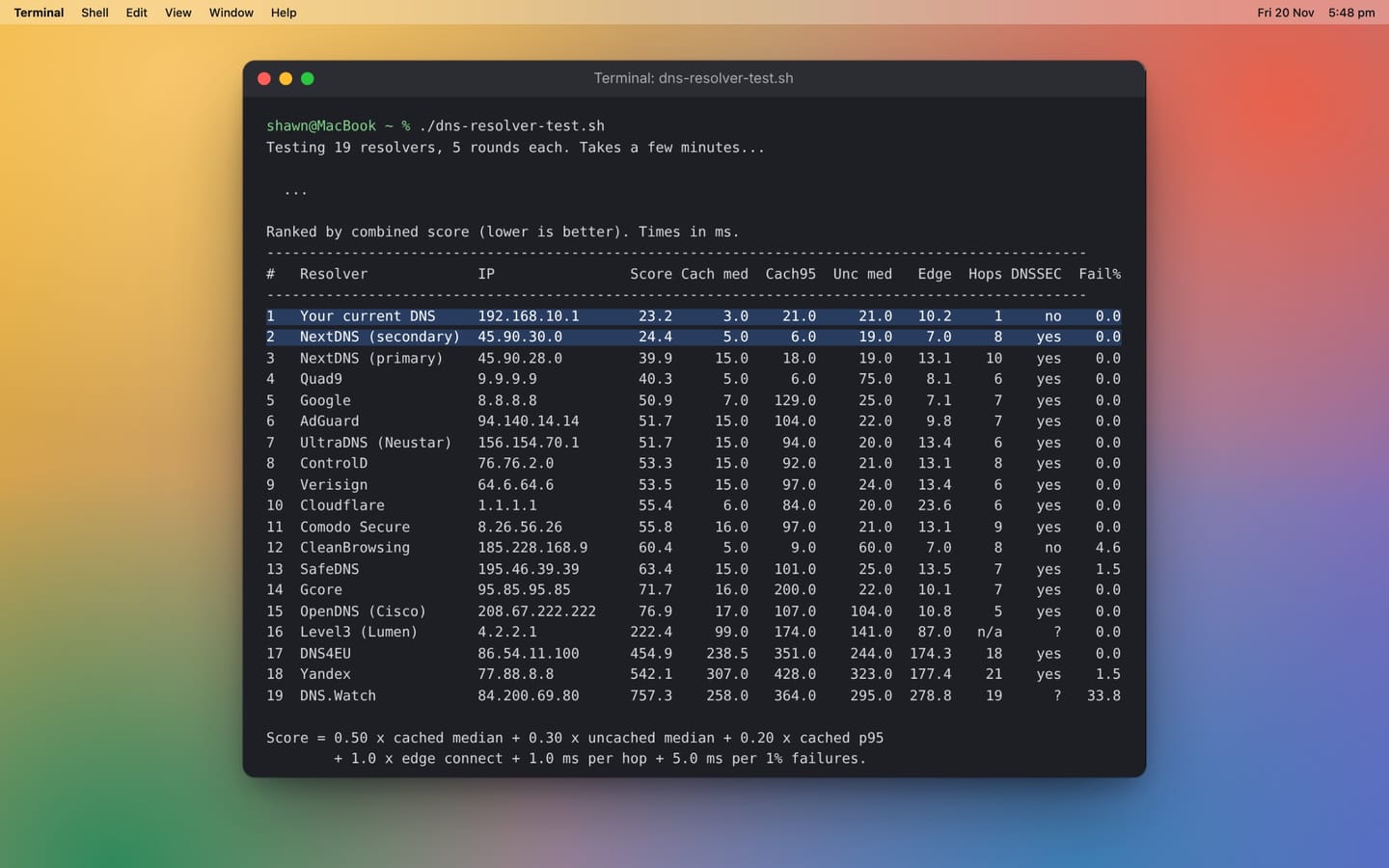
| Run (20 Nov 2026) | Gateway rank | Gateway fresh lookups (ms) | Gateway cached (ms) | Gateway score | NextDNS direct, fresh lookups (ms) |
|---|---|---|---|---|---|
| 5:54pm, after | 2 of 19 | 21 | 3 | 31.0 | 19 |
| 5:48pm, after | 1 of 19 | 21 | 3 | 23.2 | 19 |
| 5:23pm, before | 4 of 22 | 101 | 3 | 47.5 | 26 |
Fresh lookups through the gateway fell from 101 ms to 21 ms and stayed there. The site check showed the gateway and NextDNS's Melbourne address leaving through the same server. Encryption now costs me about 2 ms over plain DNS to the same place.
The gateway and NextDNS's Melbourne address swapped first and second place between the two later runs. Treat them as tied. They are the same server reached two ways.
One honest caveat. The edge measure turned out to be the noisiest column. Cloudflare's edge time went from 23 ms in one run to 7 ms in the next. My gateway's went from 10 ms to 20 ms. The big services rotate which server address they hand out, so one run is a snapshot. Three runs agreeing on the top of the table is a far better signal than any single number.
What I learned
- Test from where you are. Global and regional rankings are a fine shortlist. Your provider's routing decides the rest. From my connection, the gap between a Melbourne and a Sydney answer was about 10 ms on every lookup.
- The fastest resolver is not the whole answer. What matters is the server a resolver sends you to. A lookup happens once. The distance to the server you are sent to is paid on every connection.
- Check the path, not just the provider. I had the right provider all along. My gateway was reaching it the long way. If you use encrypted DNS on a router, test.nextdns.io (or your provider's equivalent) tells you which site actually answers.
- Hardcoded DNS is common. Some devices ship with Cloudflare or Google DNS built in and ignore what your network hands out. Block outbound DNS (ports 53 and 853) to anything but your gateway. NextDNS also has a Block Bypass Methods setting that catches the encrypted routes a port block can't.
- Hops are a diagnostic, not a score. Every big resolver is anycast. A short route to Singapore still loses to a longer one to Melbourne. Latency already captures what matters.
- One run is a snapshot. Run the test at different times of day and again after any change to your network or provider.
Run it yourself
The script runs on macOS as is. On Linux, install dnsutils (or bind-tools) and traceroute first. Save it as dns-resolver-test.sh, then run it.
chmod +x dns-resolver-test.sh
./dns-resolver-test.sh        # 5 rounds, a few minutes
./dns-resolver-test.sh 10     # 10 rounds, steadier numbers
It prints a ranked table and a list of where each resolver answered from. It also saves everything to a CSV next to the script.
Before you run it, a few things to do.
- Swap in your own test names. Edit
CACHED_DOMAINSandEDGE_HOSTSnear the top. Your router's top destinations list is the best source. - Open your firewall if you block outbound DNS. Otherwise every public resolver will show 100% failures. Close it again when you are done.
- Run it on the network you care about. A wired machine gives the cleanest numbers. Home, office and a phone hotspot will all rank differently.
- Speed isn't the only filter. Some resolvers block content by design and some are operated from jurisdictions you may not want handling your lookups.
- Change the weights to suit. They sit at the top of the script. If you care less about the edge measure, turn
W_EDGEdown.
#!/bin/bash
# DNS resolver test - speed, consistency, answer quality (edge), hops, DNSSEC, ranking.
# Run from your own connection.
# Needs `dig`, `curl` and `traceroute` (all built into macOS; Linux: dnsutils + traceroute).
#
# Usage:   ./dns-resolver-test.sh [rounds]      (default 5 rounds)
# Output:  ranked table on screen + dns-results-<timestamp>.csv
#
# Method mirrors DNSPerf: IPv4, UDP, 1-second timeout, no retries.
#   Cached   = popular domains the resolver almost certainly has in cache
#   Uncached = random names that force the resolver to do a full lookup
#   p95      = 95th percentile of cached queries (consistency / worst-case feel)
#   Edge     = how close the servers are that the resolver SENDS you to: it resolves
#              Microsoft 365, Netflix etc, then times a connection to the address returned.
#              A fast resolver that points you at Singapore loses here.
#   Hops     = traceroute hop count to the resolver IP (n/a = it does not answer traceroute)
#   Site     = which of the resolver's sites answered you (listed under the table).
#              Uses the resolver's own ID where it publishes one; otherwise the address
#              it queries the internet from, with its reverse name if it has one.
#   DNSSEC   = whether the resolver validates signatures
#
# SCORE (lower is better) - change the weights here to suit:
W_CACHED=0.50      # x cached median ms
W_UNCACHED=0.30    # x uncached median ms
W_P95=0.20         # x cached p95 ms
W_EDGE=1.0         # x edge connect ms (paid on every connection, so weighted heavily)
W_HOP=1.0          # ms penalty per hop (unknown hops = average of the known ones)
W_FAIL=5.0         # ms penalty per 1% of failed queries

ROUNDS="${1:-5}"

# Left out: Alternate DNS (no answers in my tests), DNSFilter and FlashStart
# (return block pages without an account, so their numbers mislead).
# Name|IP  - edit freely. Add your ISP or office resolver to compare.
RESOLVERS="
Cloudflare|1.1.1.1
Google|8.8.8.8
Quad9|9.9.9.9
OpenDNS (Cisco)|208.67.222.222
NextDNS (primary)|45.90.28.0
NextDNS (secondary)|45.90.30.0
AdGuard|94.140.14.14
CleanBrowsing|185.228.168.9
ControlD|76.76.2.0
Comodo Secure|8.26.56.26
UltraDNS (Neustar)|156.154.70.1
Verisign|64.6.64.6
Level3 (Lumen)|4.2.2.1
Yandex|77.88.8.8
DNS.Watch|84.200.69.80
SafeDNS|195.46.39.39
Gcore|95.85.95.85
DNS4EU|86.54.11.100
"

# Taken from my UniFi top destinations. Swap in your own.
CACHED_DOMAINS="time.cloudflare.com pool.ntp.org captive.apple.com gateway.icloud.com imap.gmail.com calendar.google.com google.com ping.ui.com microsoft.com office.com"
UNCACHED_PARENTS="wikipedia.org cloudflare.com bom.gov.au"
# Services whose answers vary by location. Swap in whatever you rely on.
EDGE_HOSTS="gateway.icloud.com mediaservices.cdn-apple.com www.google.com calendar.google.com outlook.office365.com teams.microsoft.com www.netflix.com"

command -v dig >/dev/null 2>&1 || { echo "dig not found. Install dnsutils / bind-tools."; exit 1; }

# Include whatever resolver this machine currently uses, as a baseline.
SYS=$(awk '/^nameserver/ && $2 !~ /:/ {print $2; exit}' /etc/resolv.conf 2>/dev/null)
[ -n "$SYS" ] && RESOLVERS="Your current DNS|$SYS
$RESOLVERS"

STAMP=$(date +%Y%m%d-%H%M%S)
CSV="dns-results-$STAMP.csv"
TMP=$(mktemp -d)
trap 'rm -rf "$TMP"' EXIT
echo "$RESOLVERS" | grep '|' > "$TMP/list"
TOTAL=$(grep -c '|' "$TMP/list")

# Prints query time in ms, or "FAIL"
query() {
  out=$(dig +tries=1 +time=1 +noall +stats +comments @"$1" "$2" A 2>/dev/null)
  if echo "$out" | grep -Eq "status: (NOERROR|NXDOMAIN)"; then
    echo "$out" | awk '/Query time:/ {print $4; f=1} END {if (!f) print "FAIL"}'
  else
    echo "FAIL"
  fi
}

# Edge: resolve a host via this resolver, then time a TCP connect (port 443) to the
# first address returned. Best of 2. Timings are cached per address, so resolvers
# that return the same address get the same number.
edge() {
  ip=$(dig +short +tries=1 +time=1 @"$1" "$2" A 2>/dev/null | grep -E '^[0-9]+\.[0-9]+\.[0-9]+\.[0-9]+$' | head -1)
  [ -z "$ip" ] && { echo "FAIL"; return; }
  f="$TMP/ct.$2.$ip"
  if [ ! -f "$f" ]; then
    for i in 1 2; do
      curl -s -o /dev/null --connect-timeout 2 --max-time 4 --resolve "$2:443:$ip" \
           -w '%{time_connect}\n' "https://$2/" 2>/dev/null
    done | awk '$1 > 0 && (!n || $1 < m) {m = $1; n = 1} END {if (n) printf "%.1f\n", m * 1000; else print "FAIL"}' > "$f"
  fi
  cat "$f"
}

# Hop count: ICMP first (most resolvers answer it), then UDP. "n/a" if never reached.
hops() {
  for mode in "-I" ""; do
    h=$(traceroute -n $mode -q 1 -w 1 -m 25 "$1" 2>/dev/null |
        awk -v ip="$1" '$2 == ip {print $1; exit}')
    [ -n "$h" ] && { echo "$h"; return; }
  done
  echo "n/a"
}

# Site: ask the resolver to identify itself; fall back to its outbound address.
site() {
  for q in id.server hostname.bind; do
    s=$(dig +short +tries=1 +time=1 @"$1" CH TXT "$q" 2>/dev/null | grep -v '^;' | head -1 | tr -d '"|,')
    [ -n "$s" ] && { echo "id: $s"; return; }
  done
  e=$(dig +short +tries=1 +time=2 @"$1" TXT o-o.myaddr.l.google.com 2>/dev/null |
      tr -d '"' | grep -E '^[0-9a-fA-F:.]+$' | head -1)
  [ -z "$e" ] && { echo "unknown"; return; }
  n=$(dig +short +tries=1 +time=2 -x "$e" 2>/dev/null | grep -v '^;' | head -1 | tr -d '|,')
  if [ -n "$n" ]; then echo "exits via $e ($n)"; else echo "exits via $e"; fi
}

# DNSSEC: a validating resolver sets the "ad" flag on a signed domain.
dnssec() {
  f=$(dig +tries=1 +time=2 +dnssec +noall +comments @"$1" isc.org A 2>/dev/null | grep "flags:")
  if [ -z "$f" ]; then echo "?"; elif echo "$f" | grep -q " ad[ ;]"; then echo "yes"; else echo "no"; fi
}

echo "Testing $TOTAL resolvers, $ROUNDS rounds each. Takes a few minutes..."
echo

# Traceroutes run in the background while the DNS queries run.
if command -v traceroute >/dev/null 2>&1; then
  while IFS='|' read -r NAME IP; do
    ( hops "$IP" > "$TMP/hops.$IP" ) &
  done < "$TMP/list"
else
  echo "  (traceroute not found - hops will show n/a)"
fi

HAVE_CURL=$(command -v curl)
[ -z "$HAVE_CURL" ] && echo "  (curl not found - edge will show n/a)"

N=0
while IFS='|' read -r NAME IP; do
  N=$((N + 1))
  printf "  [%2d/%d] %-20s %s\n" "$N" "$TOTAL" "$NAME" "$IP"
  r=1
  while [ "$r" -le "$ROUNDS" ]; do
    for d in $CACHED_DOMAINS; do
      echo "$NAME|$IP|cached|$(query "$IP" "$d")" >> "$TMP/raw"
    done
    for p in $UNCACHED_PARENTS; do
      echo "$NAME|$IP|uncached|$(query "$IP" "t$RANDOM$RANDOM.$p")" >> "$TMP/raw"
    done
    r=$((r + 1))
  done
  if [ -n "$HAVE_CURL" ]; then
    for h in $EDGE_HOSTS; do
      echo "$NAME|$IP|edge|$(edge "$IP" "$h")" >> "$TMP/raw"
    done
  fi
  echo "$NAME|$IP|dnssec|$(dnssec "$IP")" >> "$TMP/raw"
  echo "$NAME|$IP|site|$(site "$IP")" >> "$TMP/raw"
done < "$TMP/list"

echo
echo "  Waiting for traceroutes to finish..."
wait
while IFS='|' read -r NAME IP; do
  H=$(cat "$TMP/hops.$IP" 2>/dev/null); [ -z "$H" ] && H="n/a"
  echo "$NAME|$IP|hops|$H" >> "$TMP/raw"
done < "$TMP/list"

# Summarise and score
awk -F'|' -v wc="$W_CACHED" -v wu="$W_UNCACHED" -v wp="$W_P95" -v we="$W_EDGE" -v wh="$W_HOP" -v wf="$W_FAIL" '
function sorted(k, ty, a,   n, i, j, t) {
  n = cnt[k, ty]; for (i = 1; i <= n; i++) a[i] = val[k, ty, i]
  for (i = 2; i <= n; i++) { t = a[i]; for (j = i - 1; j >= 1 && a[j] > t; j--) a[j+1] = a[j]; a[j+1] = t }
  return n
}
function median(a, n) { return (n % 2) ? a[(n+1)/2] : (a[n/2] + a[n/2+1]) / 2 }
function pct95(a, n,   i) { i = int(0.95 * n + 0.999999); if (i < 1) i = 1; if (i > n) i = n; return a[i] }
{
  k = $1 "|" $2; if (!(k in seen)) { seen[k] = 1; order[++nk] = k }
  if ($3 == "dnssec") { sec[k] = $4; next }
  if ($3 == "site")   { st[k] = $4; next }
  if ($3 == "hops")   { hop[k] = $4; if ($4 != "n/a") { hsum += $4; hn++ }; next }
  if ($3 == "edge")   { if ($4 != "FAIL") { es[k] += $4; en[k]++; esum += $4; ecnt++ }; next }
  tot[k]++
  if ($4 == "FAIL") { fail[k]++; next }
  c = ++cnt[k, $3]; val[k, $3, c] = $4
}
END {
  havg = hn ? hsum / hn : 0
  eavg = ecnt ? esum / ecnt : 0
  for (i = 1; i <= nk; i++) {
    k = order[i]; delete a; delete b
    nc = sorted(k, "cached", a); nu = sorted(k, "uncached", b)
    fp = 100 * fail[k] / tot[k]
    ed = en[k] ? sprintf("%.1f", es[k] / en[k]) : "n/a"
    if (nc == 0 || nu == 0) { printf "999999|%s|-|-|-|%s|%s|%s|%.1f|%s\n", k, ed, hop[k], sec[k], fp, st[k]; continue }
    cm = median(a, nc); p = pct95(a, nc); um = median(b, nu)
    h = (hop[k] == "n/a") ? havg : hop[k]
    e = en[k] ? es[k] / en[k] : eavg
    score = wc * cm + wu * um + wp * p + we * e + wh * h + wf * fp
    printf "%.1f|%s|%.1f|%.1f|%.1f|%s|%s|%s|%.1f|%s\n", score, k, cm, p, um, ed, hop[k], sec[k], fp, st[k]
  }
}' "$TMP/raw" | sort -t'|' -k1,1n > "$TMP/sum"

LINE="-------------------------------------------------------------------------------------------------"
echo
echo "Ranked by combined score (lower is better). Times in ms."
echo "$LINE"
printf "%-3s %-20s %-16s %6s %8s %7s %8s %6s %5s %6s %6s\n" "#" "Resolver" "IP" "Score" "Cach med" "Cach95" "Unc med" "Edge" "Hops" "DNSSEC" "Fail%"
echo "$LINE"
echo "Rank,Resolver,IP,Score,Cached median ms,Cached p95 ms,Uncached median ms,Edge connect ms,Hops,DNSSEC,Fail %,Site" > "$CSV"
awk -F'|' -v csv="$CSV" '
{
  s = ($1 == "999999") ? "-" : $1
  printf "%-3d %-20s %-16s %6s %8s %7s %8s %6s %5s %6s %6s\n", NR, $2, $3, s, $4, $5, $6, $7, $8, $9, $10
  printf "%d,%s,%s,%s,%s,%s,%s,%s,%s,%s,%s,%s\n", NR, $2, $3, s, $4, $5, $6, $7, $8, $9, $10, $11 >> csv
}' "$TMP/sum"
echo
echo "Score = $W_CACHED x cached median + $W_UNCACHED x uncached median + $W_P95 x cached p95"
echo "        + $W_EDGE x edge connect + $W_HOP ms per hop + $W_FAIL ms per 1% failures.  '-' = no answers."
echo
echo "Where each resolver answered from"
echo "$LINE"
awk -F'|' '{ printf "%-3d %-20s %s\n", NR, $2, $11 }' "$TMP/sum"
echo
echo "Saved: $CSV"
The occasional email
A few times a year, when there's something worth saying.